
Inside a Sextortion Phishing Email: How to Identify Fake Hacking Threats
Cybercriminals send emails claiming to have hacked a computer, accessed its webcam or recorded private activity, then threaten to expose the "material" unless a cryptocurrency ransom is paid.
Receiving such an email does not, by itself, prove that your device has been compromised.
What you'll learn
- How a real sextortion email was built to frighten its recipient
- Which parts were claims by the sender — and what was actually verified
- What SPF Softfail and DMARC Fail mean in the email headers
- Calm, proportionate steps to take if one reaches you
The email: an anonymised summary
- Subject
- SECURITY INCIDENT: Unauthorized Access Detected on Node
- Pretended to come from the recipient's own email address.
- Claimed spyware had been installed while the recipient browsed an inappropriate website.
- Claimed full access to the webcam, microphone, emails, chats and contacts.
- Threatened to send an alleged private recording to all of the recipient's contacts.
- Demanded USD 950 in Bitcoin.
- Set a 50-hour deadline, supposedly starting when the email was opened.
- Warned the recipient not to tell anyone about the message.
The Bitcoin wallet address and the original recipient are deliberately not published.
- No proof of access. No image, file name, contact or detail that only someone with real access would know.
- The sender address was forged. The message was not sent through the domain's authorised mail servers: SPF soft-failed and DMARC failed.
- A generic template. The wording matches mass-mailed extortion scams, including the false claim that a "notification" fires when the email is opened.
- Stopped before the inbox. The filter classified the message as phishing and quarantined it under the domain's DMARC policy.
The original email, word for word
Greetings!
Would like to introduce myself - I am a specialized hacker, and have succeeded in hacking your operating system. At this moment, I have obtained a complete access to account of yours. On top of that, I was also unnoticeably observing all your activities and spying on you for few past months. It was possible because your computer was infected with malicious spyware, which infiltrated your computer while you were visiting a website containing a***t videos.
Give me a few minutes to clarify how that affects you. Because of Trojan viruses, I am now able to have an unrestricted access to your computer as well as any other devices owned by you. In other words, I can see without any restrictions everything in your screen and even activate the camera together with microphone anytime I want, and you won't even know about that. Moreover, I have complete access to confidential data of yours including emails, chat history etc.
You may be rightfully puzzled how come your antivirus is not able to detect the harmful software of mine. I don't mind explaining that at all: my malicious software is driver-based; hence it refreshes its signatures every 4 hours, which makes it impossible for your antivirus to identify it.
I have come up with a video exposing the scenes of your passionate m*********** sessions on the left side, whereas on the right side it shows the dirty videos you were watching during that time .^.
Trust me, it takes several mouse clicks to distribute this video to your entire email addresses list as well as messenger contacts on your PC or other devices. Additionally, I can easily share all your emails as well as chat history to public too.
I honestly think you would certainly like to abstain from letting that happen. There is a solution for you in this case - perform 950 USD transfer in Bitcoin equivalent to Bitcoin account of mine (it is really not difficult to do, and you can find online the step-by-step guide, if you have no idea about it).
My bitcoin account details are below as follows (Bitcoin wallet): [wallet address removed by Enet]
Once the aforementioned amount gets transferred to my account, I will straight away erase all those kinky videos and vanish from your life completely. Please, settle this payment within 50 hours (2 days). A notification will be sent to me right after this email gets opened, which will trigger the countdown.
Believe me, I am very cautious, professional and never fail. If I get to know about you sharing this message with anyone else, I will right away distribute your private videos to public.
Best of luck!
What we changed
- Our client's name, mailbox and domain are replaced with
[email protected]. - The Bitcoin wallet address is removed so nobody pays it by mistake.
- Two explicit words are masked with asterisks.
- Message, filter and quarantine IDs are removed from the headers.
Everything else — wording, spelling, punctuation and the odd .^. — is unchanged.
Received the same email?
The text is copied word for word to thousands of people. Do not pay or reply — see what to do.
Show the full headers (anonymised)
Received: from static-190-181-30-110.acelerate.net ([190.181.30.110]) by mx278.antispamcloud.com with esmtp (Exim 4.94.2) (envelope-from <[email protected]>) id [removed] for [email protected]; Wed, 11 Nov 2026 07:57:33 +0100
Content-Type: text/plain; charset=us-ascii
Content-Transfer-Encoding: quoted-printable
From: [email protected]
Mime-Version: 1.0 (1.0)
Date: Wed, 11 Nov 2026 02:51:32 -0400
Subject: SECURITY INCIDENT: Unauthorized Access Detected on Node
Message-Id: <[email protected]>
To: [email protected]
X-Mailer: iPhone Mail (21G93)
Received-SPF: softfail (mx278.antispamcloud.com: transitioning domain of example.com does not designate 190.181.30.110 as permitted sender) client-ip=190.181.30.110; [email protected]; helo=static-190-181-30-110.acelerate.net;
X-SPF-Result: mx278.antispamcloud.com: transitioning domain of example.com does not designate 190.181.30.110 as permitted sender
Authentication-Results: mx278.antispamcloud.com; iprev=pass (static-190-181-30-110.acelerate.net) smtp.remote-ip=190.181.30.110; spf=softfail smtp.mailfrom=example.com; dmarc=fail header.from=example.com
Authentication-Results: antispamcloud.com; spf=softfail [email protected]
X-N-ableSpamExperts-Class: phish
X-N-ableSpamExperts-Evidence: DMARC - Quarantine
X-Filter-ID: [removed]
X-Report-Abuse-To: [email protected]
X-Complaints-To: [email protected]
X-Quarantine-Release-ID: [removed]Anatomy of the scam
Impersonation
The From and To fields both show the recipient's own address, so the message seems to come from inside the mailbox. The address was simply typed in — spoofed.
Fear
The sender claims to hold a compromising recording. Embarrassment is meant to stop the recipient from thinking clearly or asking for help.
Technical intimidation
Words like Trojan, spyware, driver-based malware, webcam and microphone make the threat sound credible, but no technical proof is offered.
Urgency
A 50-hour deadline and a claimed "countdown" pressure the recipient to pay before checking the facts.
Extortion
Payment in cryptocurrency is demanded because transfers are hard to reverse and the receiver is hard to identify.
Isolation
The recipient is told not to share the message. Isolation keeps victims away from the IT teams and friends who would recognise the scam.
What the email headers reveal
| Field | Observed result |
|---|---|
| Observed sending IP | 190.181.30.110The mail server endpoint that delivered the message. It does not identify the person behind it. |
| Observed sending hostname | static-190-181-30-110.acelerate.netReverse DNS for that IP (iprev=pass only means the name and IP match each other). |
| SPF | Softfail The sending IP was not authorised under the domain's SPF policy. |
| DMARC | Fail The message did not meet the domain's DMARC authentication and alignment requirements. |
| Receiving security classification | Phish The receiving gateway classified the message as phishing. |
| Security gateway | N-able SpamExperts Applied the domain's DMARC quarantine policy, so the message never reached the inbox. |
Sanitised header excerpt
Received-SPF: softfail
  client-ip=190.181.30.110

Authentication-Results:
  spf=softfail smtp.mailfrom=example.com;
  dmarc=fail header.from=example.com

X-N-ableSpamExperts-Class: phish
X-N-ableSpamExperts-Evidence: DMARC - Quarantine
Important limitation
In this context these results are strong warning signs, but authentication failures alone do not prove who sent the message, and they say nothing about whether any device was compromised. The IP address identifies the mail-sending endpoint that was observed, not the criminal.
SPF Softfail
The observed sending IP was not authorised under the domain's SPF policy. The precise meaning depends on the published SPF record — a softfail (~all) asks receivers to be suspicious rather than reject.
DMARC Fail
The message did not satisfy DMARC: neither SPF nor DKIM passed in alignment with the domain shown in the From address.
SpamExperts: phish
The receiving gateway classified the message as phishing and applied the domain's published DMARC quarantine policy.
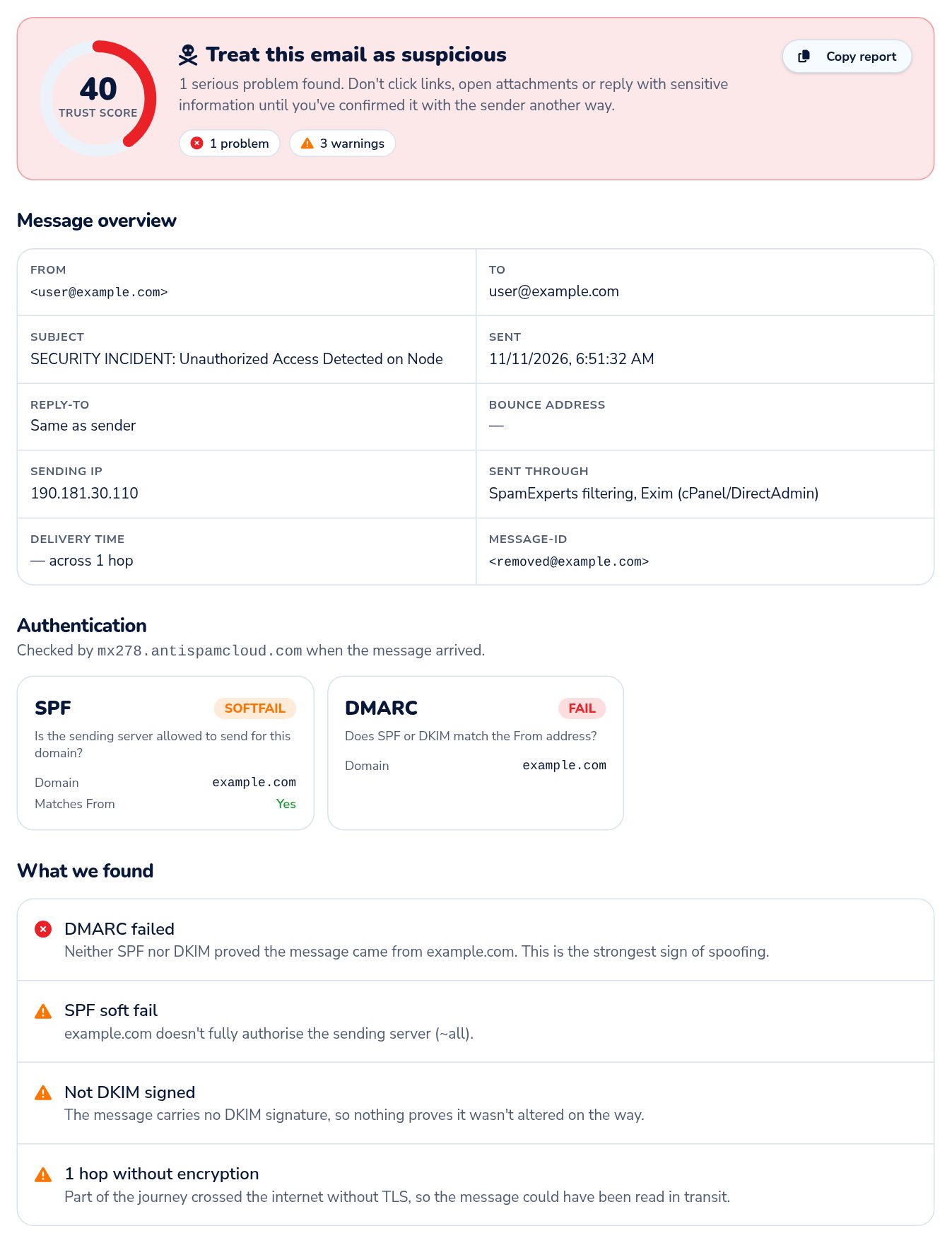
The same headers, checked with our free tool
We pasted the anonymised headers above into our Email Header Analyzer. It gave the message a trust score of 40 out of 100 and told us to treat it as suspicious:
- DMARC failed — nothing proves the message came from the domain in the From line.
- SPF soft fail — the sending server is not authorised for that domain.
- No DKIM signature — nothing shows the message is unaltered.
The tool works entirely in your browser, so a suspicious message you paste is never uploaded. Screenshot taken 13 November 2026.
Check an email yourselfHow SPF, DKIM and DMARC work
SPF
Lists the mail servers authorised to send email for a domain.
DKIM
Adds a cryptographic signature to each message that receiving systems can verify.
DMARC
Checks that SPF or DKIM align with the visible From domain, and tells receivers how to handle messages that fail.
Step 1
Sending server
Delivers the message and claims a sender domain.
Step 2
SPF & DKIM checks
Is the IP authorised? Is the signature valid?
Step 3
DMARC alignment & policy
Do the results match the From domain? Monitor, quarantine or reject?
Step 4
Receiving mail system
Delivers, quarantines or rejects the message.
A correctly configured DMARC policy helps reduce exact-domain impersonation. It does not eliminate phishing: criminals can still use lookalike domains or free email accounts. Learn more in our guide to email spoofing.
What to do if you receive a sextortion email
- 1Do not panic. The claims may be completely fabricated.
- 2Do not pay the ransom.
- 3Do not reply to the sender.
- 4Do not click suspicious links or open unexpected attachments.
- 5Keep the original email and its full headers for investigation.
- 6Report the message to your email administrator or security provider.
- 7If you have concerns, review recent sign-ins and active sessions on important accounts.
- 8Change passwords if there is evidence of account compromise, and use unique passwords.
- 9Turn on multi-factor authentication.
- 10Run an updated security scan if you suspect your device may be compromised.
Already paid?
Contact the financial or cryptocurrency service you used immediately, and report the incident to the authorities — in Kenya, the Directorate of Criminal Investigations or the National KE-CIRT/CC.
Keep your response proportionate to the evidence. There is no need to reinstall your computer or change every password because of this email alone.
Frequently asked questions
01Does receiving this email mean my webcam has been hacked?
02Can someone hack my computer just by sending an email?
03Can the sender know when I open an email?
04Should I pay the Bitcoin ransom?
05What does SPF Softfail mean?
06What does DMARC Fail mean?
Recommendations for domain and email administrators
- Publish and maintain an accurate SPF record.
- Enable DKIM signing for all outbound mail.
- Publish a DMARC record and monitor its aggregate reports.
- Move to an enforcement policy (quarantine or reject) after validating every legitimate sending source.
- Require MFA for email accounts and administrative access.
- Monitor suspicious outbound mail and unusual account sign-ins.
- Keep mail servers, control panels and endpoints patched.
- Give staff a clear, simple way to report suspicious messages.
Do not rush enforcement
Publishing an aggressive SPF or DMARC policy before you have identified every legitimate sending service — mail server, website forms, invoicing and newsletter tools — can block genuine business email. Start with monitoring, review reports, then tighten.
Received a suspicious email?
Do not forward it to strangers or publish personal information. Preserve the original message and full headers, then report it to your organisation's IT team or email provider.
If Enet hosts or filters your email, our support team can help you check your filtering and domain settings.